


2024-02-23
8 Best MPEG-2 Players of All Time
Summary: With this article, yuo will learn what MPEG-2 is...



Full DVD Solutions
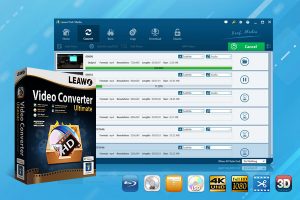
Leawo Video Converter Ultimate integrates DVD Ripper, DVD Copy and DVD Creator into one program, aming to help people solve all DVD issues in one simiple package. Preserve your precious memoris on DVD or digitize your DVD movies easily.
Video Editor
With a video editor built in, Leawo Prof. Media 13 enables you to customize media files and get an output file with your own patent, even create 3D movies, no matter you want to convert media or burn Blu-ray/DVD.

Merge
Various video clips or even audio files can be merged into a single file for great trouble saving.

Trim
Under “Trim” tab within the internal video editor, users are able to trim video clip to get wanted video clip.

Audio tracks & subtitles
Before converting video/DVD and burning video files into DVD, users are allowed to keep all the audio tracks and subitltes or selected ones in the output. Additionally, users can add external SRT/ASS/SSA subtitles for keeping in the output video file.

Effect
Users can adjust video effect based on personal preference; values like Brightness, Contrast, Saturation, and VolumeZoom can be adjusted in a range.

Crop
Under “Crop” tab within the internal video editor, users can crop video size, flip video clip horizontally or vertically, and rotate video clip clockwise or counterclockwise.

Remove Noise
Under “Remove noise” tab within the internal video editor, user can remove noise from VHS videos for a better video output.

Watermark
Text or image can be added as video watermark, and users can adjust the watermark transparency, watermark size, and watermark position.

3D
The video converter suite can play the role of a video to 3D video converter, a video to 3D DVD converter, a video to 3D converter, a DVD to 3D video converter.


Other Features
In addition to those features mentioned above, Leawo Video Converter Ultimate provides you with many other smart features to better user experience, such as the easy-to-use interface, detailed settings panel, help center for troubleshooting, etc.
Leawo Software puts emphasis on user experience, and all Leawo products are designed with an easy-to-use interface. Leawo Video Converter Ultimate is no exception. User will find the program easy to handle.
Leawo Video Converter Ultimate provides you with detailed settings panel where you can choose program language, carry out conversion/buring/downloading settings, and so on.
Users can access to Help Center to find solutions to their problems.

20+ Years Experience

10,000,000+ Happy Clients

100% Safe & Clean

100+ Countries
Step 1: Add source DVD/video/audio files
Open the “Convert” tab and add source DVD/video/audio files by clicking “Add Video” button or “Add UHD/Blu-ray/DVD” button respectively.
Step 2: Set output format
Click the “Output Profile” drop-down button and then choose “Change” option to choose output profile.
Step 3: Set output directory
Click the green “Convert” button to call out the sidebar and then set output directory.
Step 4: Start converting DVD/video/audio files
Click the bottom “Convert” button to start converting DVD/video/audio files.


Step 1: Add source video/photo files
Open the “Burn” tab and then click the “Add Video” drop-down button or “Add Photo” button to load and add source video or photo files respectively.
Step 2: Set output DVD types
After loading source video or photo files, at the bottom left corner, choose output DVD type, quality and aspect ratio.
Step 3: Burning settings
Click the green “Burn” button to call out sidebar, and then complete burning settings including “Burn to”, “Disc Label” and “Save to” options.
Step 4: Start burning DVD
Finally, click the bottom “Burn” button to start burning video or photo files to DVD.


System Requirments


Size
Version
Update

Testimonials

"
Leawo Video Converter Ultimate is competent software. This DVD and video solution suite really helps. Quite wonderful combination. Good job.

Cnet Editor

"
I have found that this software is very flexible and easy to use. Some of it is not as intuitive as I would like but it does have a range of uses. I am in the process of using it to transcode all of my videos to H265 format for quality and size! Internet in rural America does not allow for streaming and with stores carrying less physical media I have to set up my own home streaming service.
Randolph Black

"
This version have traditional chinese that is good to me . Because of my windows is traditional chinese version. I also hope this software have a link to chinese instruction website,thx.Because of I am a chinese . So many chinese know which traditional or simplified chinese words.Merry Xmas and happy new year.
YU WING KIN

Purchase Leawo Video Converter Ultimate
$ 79.95

$ 99.94
41% OFF
$ 229.95 $389.88


| Features | Leawo Video Downloader | CleverGet Video Downloader | CleverGet |
|---|---|---|---|
| Download video from 1000+ video sites |  | | |
| Download live streamings | | | |
| Download live videos via M3U8 link | | | |
| Download videos in bath | | | |
| Download YouTube playlist |  | | |
| Download YouTube channel | | | |
| Download videos at up to 8K resolution | | | |
| Download videos to audio | | | |
| Download Twitch video | | | |
| Download Netflix video | | | |
| Download Amazon Prime video | | | |
| Download HBO MAX video | | | |
| Download Deisney+ video | | | |
| Download multi-language audio tracks | | | |
| Download multi-language subtitles | | | |
| Download subtitles as independent SRT/SUP files | | | |
| Download speed | Normal | Musch Higher | Musch Higher |
| Continual update | | | |



Rip and Convert DVD of Any Kind
Create & Burn DVD
Copy and Back up Any DVD